🪪 PAN Card Tool
100% Free & Private — All processing happens in your browser. Your photos are never uploaded to any server.
PAN Card Photo,Signature & Document Resizer Tool
Crop, resize and download your photo, signature & Aadhaar card as required

Specifications below are set for the Protean (NSDL) portal.

Photo & Signature & Resizer
Photo
Resize Photo
JPEG · 200 DPI · 2.5×3.5 cm portrait · Output: Max 50 KB
Signature
Resize Signature
JPEG · 200 DPI · 4.5×2 cm landscape · Output: Max 50 KB
Remove Photo Background Remove Signature Background Pancard PDF Resizer
Merge Supporting Documents (Aadhaar Card)
Upload Aadhaar front & back as separate images (JPEG/PNG). They will be merged side-by-side into a single downloadable PDF. Max 300 KB each.
Aadhaar Front
Aadhaar Front
Aadhaar Front
No file selected
Aadhaar Back
Aadhaar Back
Aadhaar Back
No file selected
✔ Merged Aadhaar Preview (Front + Back):
Merged preview
px (white space between front & back)
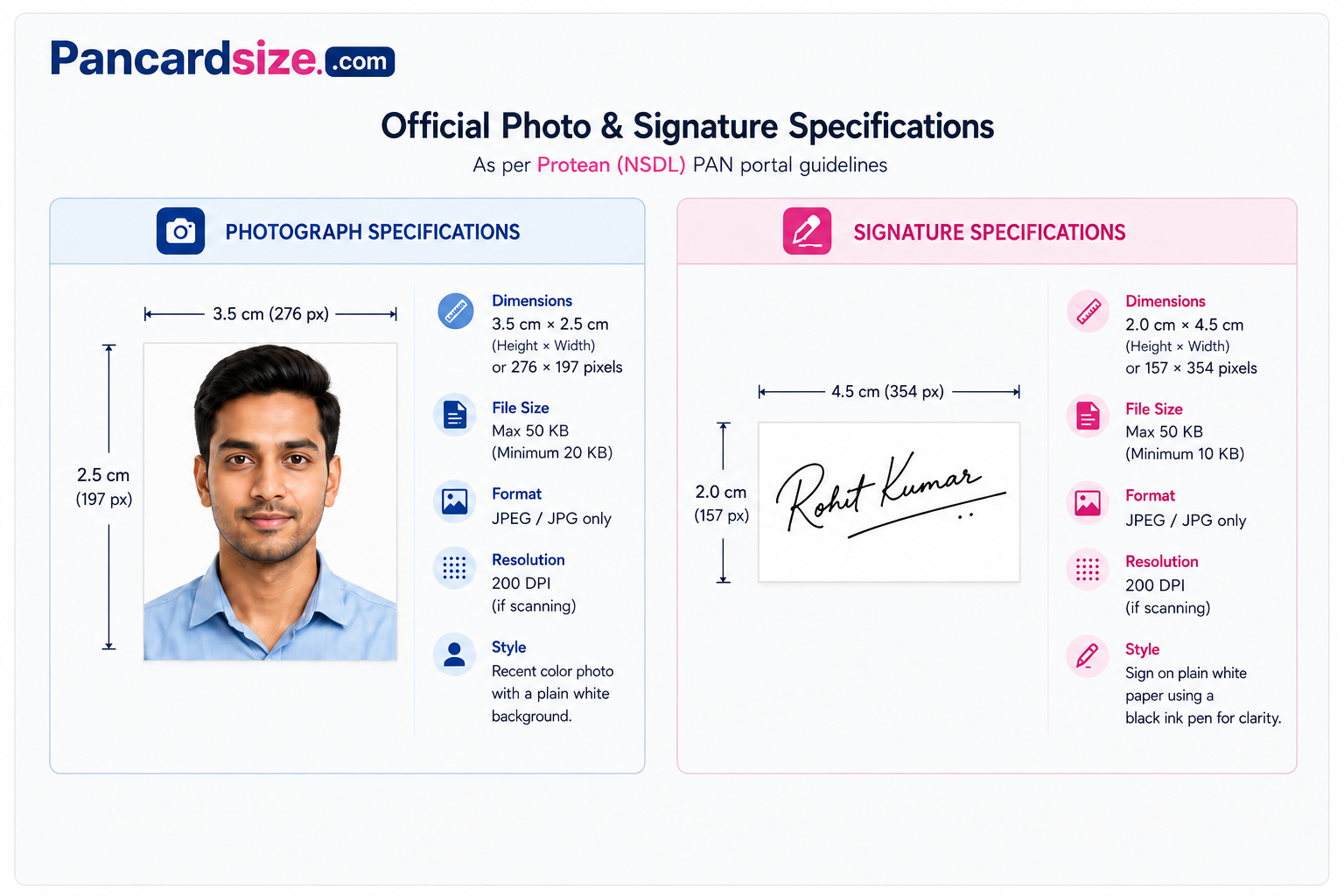
Official PAN Card Photo Specifications

Resize & Format Your Photos for PAN Card Application

Instantly resize your photo, signature and merge your Aadhaar card front & back into a single PDF — matched to whichever portal you're applying through, NSDL (Protean) or UTIITSL.

Photo: 2.5×3.5 cm · 200 DPI · Max 50 KB
Signature: 4.5×2 cm · 200 DPI · Max 50 KB
Aadhaar: Merge Front+Back → Single PDF
No upload · No registration · Free
Open Free Tool
How to Use This Tool
Follow these simple steps to prepare all documents needed for your PAN card application in minutes
01

Upload Your Photo

Click the red browse button next to "Upload Photo". Select a clear, passport-style face photo from your device. A cropping window will open automatically.

02

Crop to Exact Size

The crop box is pre-locked to the correct 2.5×3.5 cm ratio. Drag corners to resize, drag the box to reposition, then click "Crop & Save".

03

Download Photo (40–50 KB)

The tool auto-adjusts JPEG quality to keep the file within the selected portal's limit and embeds the correct DPI metadata. Click Download to save your resized photo.

04

Upload & Crop Signature

Sign on white paper, photograph it clearly. Upload under "Upload Signature". The crop box is locked to 4.5×2 cm (landscape). Crop and download similarly.

05

Upload Aadhaar Front & Back

Upload photos of both sides of your Aadhaar card. Crop Front first — Back will auto-match the same aspect ratio. Resize corners freely to choose your crop area.

06

Download Merged PDF

Once both Aadhaar images are cropped, a preview appears showing them merged side-by-side. Click "Download Merged PDF" to get the final document.

Official PAN Card Document Specifications
Exact requirements as per NSDL and UTIITSL guidelines for online PAN card application

📸 Passport Size Photo

Dimensions3.5 × 2.5 cm
OrientationPortrait (vertical)
FormatJPEG / JPG
Resolution200 DPI minimum
File Size50 KB max
BackgroundPlain white preferred
Face coverage70–80% of frame

✍️ Signature

Dimensions4.5 × 2 cm
OrientationLandscape (horizontal)
FormatJPEG / JPG
Resolution200 DPI minimum
File Size50 KB max
BackgroundPlain white paper
Ink colourBlack or blue preferred

🪪 Aadhaar Card (Supporting Document)

RequiredFront & Back as 1 PDF
FormatPDF
Resolution200 DPI
Max size300 KB per page
Both sidesMust be clearly visible
Merge styleSide-by-side horizontal

Note: the two portals occasionally publish slightly different upload limits. Always confirm the current numbers on the official NSDL or UTIITSL site before submitting.

Frequently Asked Questions
Everything you need to know about PAN card photo requirements
What is the correct photo size for PAN card application?
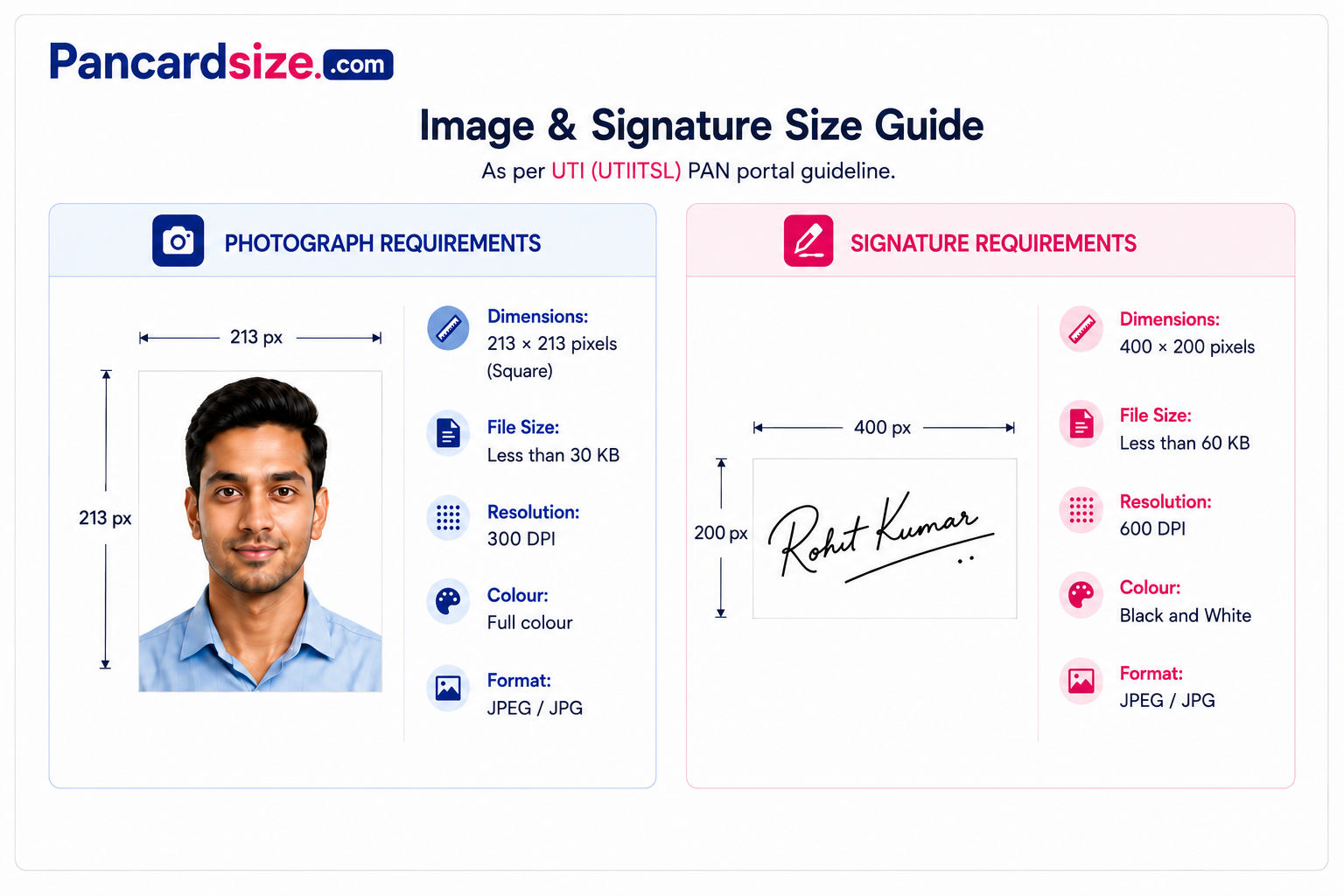
This depends on the portal. For NSDL (Protean): 3.5 cm (height) × 2.5 cm (width), portrait, JPEG, 200 DPI, 20–50 KB (≈276×197 px). For UTIITSL: a 213×213 px square photo, JPEG, 300 DPI, under 30 KB. Use the portal switch above the tool to load the correct crop ratio and size target automatically.
What size should my signature be for PAN card?
For NSDL (Protean): 4.5 cm (width) × 2 cm (height) landscape, 200 DPI, 10–50 KB (≈354×157 px). For UTIITSL: 400×200 px landscape, 600 DPI, under 60 KB. Sign with black or blue ink on plain white paper and photograph it clearly — the tool locks the crop ratio and targets the right file size for whichever portal you select.
Why does the PAN portal ask for a specific DPI? What does DPI mean?
DPI stands for Dots Per Inch — it describes the print resolution metadata stored inside a JPEG file. NSDL asks for 200 DPI on photo, signature and the merged Aadhaar PDF; UTIITSL asks for 300 DPI on the photo and 600 DPI on the signature, but 200 DPI on the merged supporting-document PDF. The actual pixel count is fixed, but the DPI tag tells printing systems and portals the intended physical print size. Our tool patches the JPEG binary directly to embed the correct DPI value for whichever portal is selected.
Why do I need to merge Aadhaar front and back into one PDF?
Both the NSDL and UTIITSL "Upload Supporting Documents" sections accept a single PDF per document type, and Aadhaar has two sides. Our tool crops both images to the same height, merges them side-by-side, and generates a single-page color PDF at 200 DPI — capped at 300 KB for NSDL or up to 2 MB for UTIITSL, depending on which portal you've selected.
Is my photo uploaded to your server? Is it private?
No. Absolutely nothing is uploaded to any server. All image processing — cropping, resizing, DPI injection, and PDF generation — happens entirely inside your browser using JavaScript. Your photos never leave your device. You can even use this tool with Wi-Fi turned off after the page loads.
My photo file size is below the minimum even after cropping. What should I do?
This can happen when the image has very simple content (e.g., a plain white background with minimal detail). On portals with a minimum (NSDL: 20 KB photo / 10 KB signature), the tool will display a yellow warning chip showing the actual KB. UTIITSL has no published minimum — only a maximum — so a smaller file is fine there. In practice most portals accept files toward the lower end of their range; the upper number is a hard cap, not a target.
Can I rename the downloaded photo / signature file?
Yes! After cropping, the filename field becomes editable. Click on it and type any name you want (e.g., ram_photo.jpeg). The Download button will use that name when saving the file. By default it downloads as photo.jpeg and signature.jpeg respectively.
Which documents are accepted as identity/address proof for PAN card?
Common accepted documents include: Aadhaar Card, Passport, Voter ID, Driving Licence, Ration Card, Bank Statement, Electricity Bill, and Telephone Bill. Aadhaar is the most commonly used and instantly accepted. For identity proof documents, front and back of Aadhaar merged into a single PDF is the simplest option.
What's the difference between the NSDL and UTIITSL specifications?
The two portals use different photo shapes, resolutions and file-size caps. NSDL wants a portrait 276×197 px photo at 200 DPI (20–50 KB) and a 354×157 px signature at 200 DPI (10–50 KB), with the merged Aadhaar PDF capped at 300 KB. UTIITSL wants a square 213×213 px photo at 300 DPI (under 30 KB) and a 400×200 px signature at 600 DPI (under 60 KB), with the merged Aadhaar PDF allowed up to 2 MB. The merged PDF stays in color for both portals. Use the portal toggle above the tool so every crop, size target and DPI value matches the portal you're actually applying through.
Disclaimer: PAN Card Size is an independent free tool and is not affiliated with NSDL, UTIITSL, Income Tax Department or any government body. Always verify current specifications on the official NSDL (onlineservices.nsdl.com) or UTIITSL portal before submitting your application.